 Kampanyalar

 Hesaplama Araçları
 Ürün ve Hizmet Ücretleri
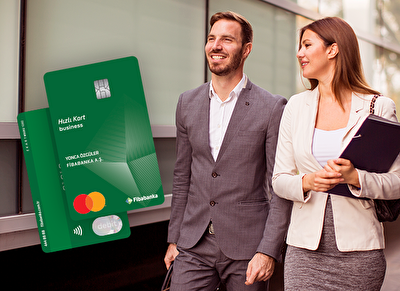

The commercial bank card Business Hızlı Kart! will meet your cash needs by providing access to your demand deposit account from all ATMs in Turkey and abroad, regardless of location, in addition to Fibabanka ATMs!
Fibabanka offers your company the advantages of easy and accessible service with Business Hızlı Kart!
At Fibabanka ATMs, as well as all ATMs in Turkey and abroad, you can use your card, make cash withdrawals up to the daily limit set, and easily make purchases at all POS devices.
You can make fast and secure online purchases via websites using the 3D secure feature whenever you wish.
Additionally, you can withdraw money from Akbank ATMs as many times as you wish, make deposits and check balances from PTT kiosks up to 5 times per month, and all these transactions are free of charge!
You can apply for Business Hızlı Kart through our Fibabanka Mobile and Internet Banking channels, our 444 88 88 Phone Banking service, or our branches.
How Can I Create My Business Hızlı Kart Password?
You can create your Fibabanka Hızlı Kart password through our Mobile and Internet Banking channels, via SMS, or by calling our Phone Banking at 444 88 88.
How Can I Create My Card PIN via Fibabanka Mobile or Internet Banking?
After logging into our Fibabanka Mobile or Internet Banking channels, you can create your Business Hızlı Kart password within seconds by following the steps: Products → Cards → My Debit Cards → Card Details → Card Settings → Change Password, or by following the steps: Transactions → Cards → Card Password Transactions.
How Do I Create My Card Password by SMS?
You can send an SMS to 3422 by leaving a space between your 4 digit password, the first 2 letters of your FIB card and the last 4 digits of your card that you will type and create a Decryption.
EXAMPLE: CODE 1234 PIN 5678 ➜ SMS sent to 3422.
My Card Has Been Renewed, Will the Password Change?
In renewal processes due to card expiration, chip malfunction on the card, or physical damage, you do not need to create a new password. You can use your old card's password for ATM or POS transactions with your new card. Your password will be automatically assigned to your new card after the process is completed.
My Card Was Replaced Due to Loss or Theft; Will the Password Be Changed?
Yes. For your replacement card issued due to loss or theft, you can create your new password through Fibabanka Mobile and Internet Banking channels, via SMS, or by calling our Phone Banking at 444 88 88. After you create your new password, your password will be loaded onto your card and activated during your first transaction at an ATM or POS terminal.
The Business Hızlı Kart is a free debit card. There is no annual service fee.
You can use Business Hızlı Kart at ATMs and POS devices with the "MasterCard" logo anywhere in the world.
You can define one main account opened in TL or foreign currency and up to 9 other accounts for Business Hızlı Kart.
You can apply for Business Hızlı Kart at our branches.
You can activate the "Online Shopping" and "Telephone/Mail Order Shopping" features either during your application or afterwards through Fibabanka Mobile and Internet Banking channels by following these steps: Products → Cards → My Bank Cards → Card Details → Card Settings.
Through our Fibabanka Mobile and Internet Banking channels, by following the steps Products → Cards → My Debit Cards → Card Details, you can manage your card-linked accounts as you wish and easily add or remove accounts.
After logging into our Fibabanka Mobile or Internet Banking channels, you can create your Business Hızlı Kart password in seconds by following the steps: Products → Cards → My Debit Cards → Card Details → Card Settings → Change Password, or by following the steps: Transactions → Cards → Card Password Transactions.
After logging into our Fibabanka Mobile or Internet Banking channels, you can change the online shopping, cash withdrawal, and physical POS transaction limits for your Business Fast Card by following the steps: Products → Cards → My Debit Cards → Card Details → Transaction Limits.
After logging into our Fibabanka Mobile or Internet Banking channels, you can turn the contactless payment feature of Business Hızlı Kart on or off by following these steps: Products → Cards → My Debit Cards → Card Details → Card Settings.
After logging into our Fibabanka Mobile or Internet Banking channels, you can turn the overseas shopping feature of Business Hızlı Kart on or off by following these steps: Products → Cards → My Debit Cards → Card Details → Card Settings.
After logging into our Fibabanka Mobile or Internet Banking channels, you can temporarily deactivate Business Hızlı Kart by following these steps: Products → Cards → My Debit Cards → Card Details → Card Settings. Your card will automatically be reactivated 24 hours after it is temporarily deactivated.

 Bireysel


 KOBİ ve Tarım
 Kurumsal / Ticari
 Özel Bankacılık
 Servis Bankacılığı


 EN
EN

 Mobil’den
  Kiraz Hesap
  İhtiyaç Kredisine
  FX Market ile
  Hesaplama