 Kampanyalar

 Hesaplama Araçları
 Ürün ve Hizmet Ücretleri
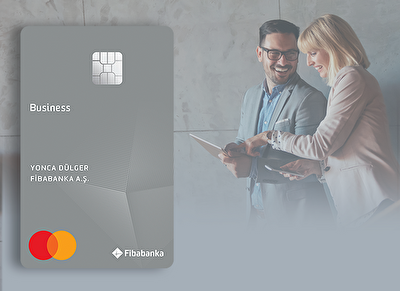

Fibabanka Business Credit Card, the business-specific credit card. With opportunities that earn rewards as you spend, special offers tailored to you, the ability to add additional cards for multiple users, and cash advance benefits, the Fibabanka Business Card is always by your side!
What Does Fibabanka Business Credit Card Offer?
How can a credit card make your spending advantageous? The answer is at Fibabanka! At Fibabanka, you can enjoy the convenience of splitting your cash payment transactions into installments with your credit card, earn rewards as you use your card and benefit from surprise campaigns, and experience fast and secure online shopping via websites with the 3D Secure feature. Wherever you are, Fibabanka offers cash advance convenience 24/7 whenever you need cash.
Make Your Corporate Payments Easily with Fibabanka Business Credit Cards!
You can pay your contracted institution bills online via your credit card using Fibabanka Mobile and Internet Banking, and set up automatic payment instructions without having to track your bills monthly.
How Can I Apply for a Fibabanka Business Credit Card?
You can apply for the Fibabanka Business Credit Card at all our branches.
How Can I Use My Fibabanka Business Credit Card for Online and Telephone/Mail Order Purchases?
Whether during your application or later, you can activate the "Online Shopping" and "Phone/Mail Order Shopping" features from Fibabanka Mobile and Internet Banking by following the steps: Products → Cards → My Commercial Credit Cards → Card Settings.
Your Fibabanka Business Credit Card features Contactless and Chip Technology!
Contactless Payment is a card feature designed to make your payment transactions faster and easier.
With our contactless-enabled debit and credit cards, you can start enjoying the convenience of contactless shopping.
The contactless transaction limit for your Fibabanka Business Credit Card is 2,500 TL per transaction. At all payment points equipped with readers bearing the contactless payment symbol, you can make transactions up to 2,500 TL without a PIN; for transactions exceeding 2,500 TL, you must enter your PIN at the POS terminal. To make a payment with your contactless-enabled card, simply hold it close to the reader.
Thanks to the multiple security levels applied in contactless payments, you can complete your transactions securely and quickly.
Making transactions at ATMs is very easy with your Fibabanka Business Credit Card!
With the Fibabanka Business Credit Card, you can easily perform transactions such as withdrawing money, checking your balance, transferring funds between accounts, and changing your card PIN code 24/7 at Fibabanka ATMs. Furthermore, you can withdraw money as many times as you like from Akbank ATMs and make up to 5 transactions per month at PTT kiosks, all free of charge, along with making deposits and balance checks.
It is Possible to Temporarily Close Your Fibabanka Business Credit Card!
If you do not wish to cancel your credit card but only want it to be temporarily disabled, you can do so by logging into ibabanka Corporate Mobile and Internet Banking and following these steps: Products → Cards → My Commercial Credit Cards → Card Settings. This will temporarily disable your credit card. Your card will automatically be reactivated 24 hours after it is temporarily deactivated.
Manage Your Credit Card Easily with Fibabanka Corporate Mobile!
With Fibabanka Corporate Mobile and Internet Banking, you can quickly and easily make installment plans for your credit cards, increase your credit card limits, set or change passwords, and even report lost or stolen cards.
Digital slip convenience with Fibabanka! Thanks to the digital slip feature, you can instantly access your transaction details in digital format, securely track all your financial activities without using paper, and easily access your past transactions at any time. We all have a major responsibility in reducing paper consumption. You too can be environmentally conscious by using digital receipts. By following the steps you can easily make your digital slip preference: Cards → My Commercial Credit Cards → Card Listing → Card Selection → Card Transactions → In-Period Transactions or Statement → Transaction Selection → Detail → Slip Viewing. .
To download Fibabanka Corporate Mobile, you can scan the QR code or click the store buttons.


You can create your Business Credit Card password via SMS through our Fibabanka Corporate Mobile and Internet Banking channels or by calling our Phone Banking at 444 88 88. .
After logging into Fibabanka Corporate Mobile or Internet Banking, you can create your card password in seconds by following these steps: Products → Cards → My Commercial Credit Cards → Card Settings → Change Password.
You can send an SMS to 3422 by leaving a space between your 4 digit password, the first 2 letters of your FIB card and the last 4 digits of your card that you will type and create a Decryption.
EXAMPLE: CODE 1234 PIN 5678 ➜ SMS sent to 3422
In renewal processes due to card expiration, chip malfunction on the card, or physical damage, you do not need to create a new password. With your new card, you can enter your old card's PIN for ATM or POS transactions. Your PIN will be automatically assigned to your new card after the transaction.

 Bireysel


 KOBİ ve Tarım
 Kurumsal / Ticari
 Özel Bankacılık
 Servis Bankacılığı


 EN
EN

 Mobil’den
  Kiraz Hesap
  İhtiyaç Kredisine
  FX Market ile
  Hesaplama